
Phoenix
Everything You Need, All Under One Roof

Patient Management
Store patient demographics, insurance details, eligibility results, and other essential information in one place—without repeatedly entering the same data.

Scheduling
Manage appointments, providers, physician assistants, rooms, equipment, and other resources from one flexible scheduling system.

Billing & Claims
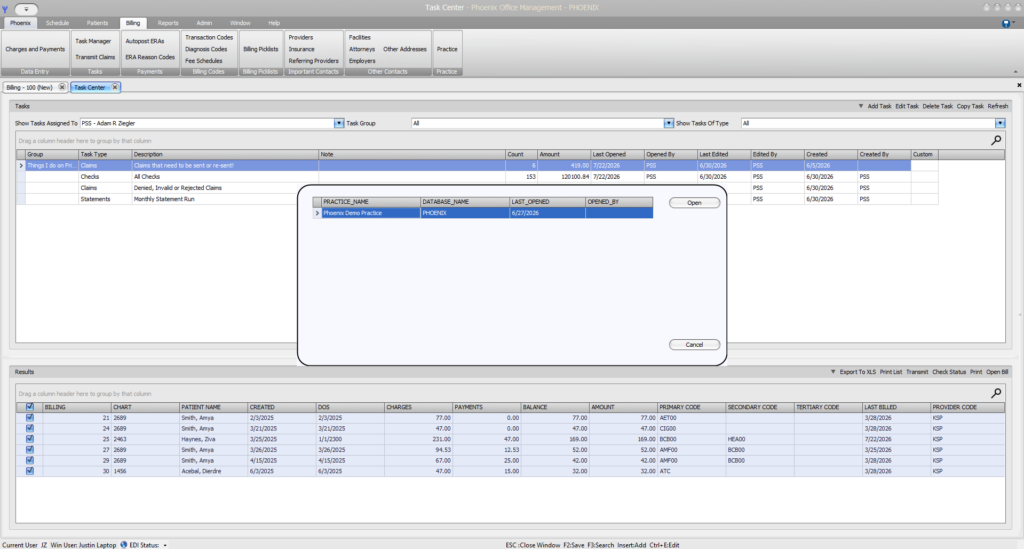
Create, validate, submit, and track claims while identifying invalid, rejected, denied, and unresolved claims that require follow-up.

Payments & Reporting
Post ERAs in bulk, preserve a clear payment audit trail, and use flexible reporting to understand what was billed, paid, and still outstanding.
1. Register the patient
2. Schedule the Visit
3. Create & Validate Claim
Save demographics and insurance information, perform eligibility checks, and carry accurate patient data into the billing workflow.
Coordinate providers, physician assistants, rooms, equipment, and other resources from one flexible scheduling system.
Build the claim, identify missing or invalid information, and correct issues before submission.
4. Submit & Track
5. Post payments
6. Follow through
Send claims through the clearinghouse and maintain a detailed history of responses, rejections, denials, and other activity.
Process ERAs in bulk while recording payments, adjustments, patient responsibility, and a complete audit trail.
Use tasks, saved searches, claim histories, and reports to find unresolved claims and keep revenue from being overlooked.
How phoenix works
From patient registration to final payment
Phoenix keeps the information, actions, and history behind each claim connected—so staff can move from scheduling to billing, payment posting, and follow-up without piecing the story together across separate programs.
Billing first by design
Built around what happens after the patient leaves
Many practice management systems include billing as one feature among many. Phoenix was built around the work required to move claims toward payment.
See what happened to every claim
Find what still requires attention
Act before filing deadlines pass

Know the Difference between Denied, Invalid & Rejected Claims
Invalid
Rejected
Denied
A problem is identified before the claim leaves the clearinghouse workflow.
The claim reached the payer, but the payer did not accept it for adjudication.
The payer processed the claim but refused payment for a stated reason.
.
Audience
Built for the people responsible for revenue
Independent Practices That Bill In House
For physicians and practice owners who manage billing themselves. Phoenix brings patient information, eligibility, scheduling, claims, payments, and follow-up into one connected system—making it easier to see what has been paid and what still needs attention.
Professional Billing Services
Manage multiple client practices, organize staff responsibilities, review claim activity, post ERAs, track unresolved balances, and produce clearer reports from one platform built around medical billing workflows.
Practices With Dedicated Billing Staff
Give your in-office billers the tools to validate claims, monitor clearinghouse responses, organize follow-up work, post payments, and maintain a complete history of every claim—while giving practice leadership better visibility into revenue.
Reporting
Answers built from your own data
Phoenix uses Microsoft SQL data tables and flexible reporting tools, allowing reports to be built around the questions your organization actually needs answered.
Clearinghouse freedom
Your software should not choose your clearinghouse for you
Phoenix is being designed to support clearinghouse flexibility. Practices and billing services can use the preferred Phoenix connection or continue working with an existing clearinghouse when supported.

See what billing-first practice management looks like
Phoenix is being built for independent practices, billing services, and medical billers who need clearer workflows, stronger claim visibility, and better control over the revenue cycle.